Project Changes Over Time
This section will go through some blurbs and topology diagrams over time of how this homelab started and how I got to where I ended up. I started this somewhere in the middle of 2024 and naturally I wanted to continue making changes.
The Early Build
This is nothing special, but it is interesting to see how this started. I wanted a NAS, I wanted to build one on my own, and I was reading all over the internet about utilizing Raspi SBCs to achieve this. I found a tech blog out there that walked me through this, and this was one of my first passes familiarizing myself with a Linux terminal to set it all up. Super basic network, its essentially a standard ISP provided home network with a Raspi NAS and reserved IP thrown into the mix. The NAS contained a USB boot media with two external NVME SSDs via USB 3.0 adapters with a RAID1 ext4 configuration if I am remembering correctly.

My First Go at Rack Mounted Equipment
As time went on I wanted to grow the network a little bit. My NAS was fine but it felt a little bit primitive running on a Raspi. I had tons of spare PC parts floating around at the time. I found an i7 2700 Alienware machine sitting by a dumpster. I was able to resurrect that machine despite the drives being dead. I was also gifted a Ryzen 3200G system. Then I had boxes of other old parts, I figured with all of this I could build a couple of PCs to re-purpose as servers.
I heard about TrueNAS Scale + Plex (docker app) through PC communities as a good storage and media consumption solution. I wanted my PC and these other machines all in one physical location so I purchased a 4U Sliger case, two cheap 2U cases, and a 14U rack. For access to my home media/storage a VPN would be in line, and I heard good things about Omada's line of VPN routers. Of all of the Omada/TP-Link equipment I own, their router is definitely a standout as far as features (ignoring their recent security issues). VLAN support, NoIP, a whole host of VPN protocols, plus a bunch of other nice to haves. Then because the ISP router was essentially going to be used as a bridge, I purchased myself a TPLink EAP610 slim AP and a 10 port TPLink PoE switch (sort of managed). I don't like tying myself to a brand or ecosystem basically ever, but I thought this was a good call at the time. Turns out a lot of features for Omada/TPLink equipment is locked behind their controllers, controller docker, or cloud services. For example the switch is "managed" but the web based front end has close to no features for 802.1Q or anything like that until you elect to manage it via their cloud services, which I do not want to do.
The Alienware PC I found in the trash was used for TrueNAS + Plex with ZFS snapshots enabled and a RAID1 configuration. The 3200G system essentially lied dormant forever, I had the idea of building a security system with it. This machine would accept more storage than the i7 machine, and I figured if I was storing camera footage I would need it. The price of drives increased, and the idea fizzled. Below is where I ended up.

Moving to a New Location
I used the above network configuration for over a year. I installed Plex to try and force myself to start ripping/storing my media locally. With drive prices increasing it didn't seem like a great long term plan and I rarely used Plex. Collecting and storing the physical media is a better option currently. And TrueNAS is great, but felt clunky to use on the go via VPN.
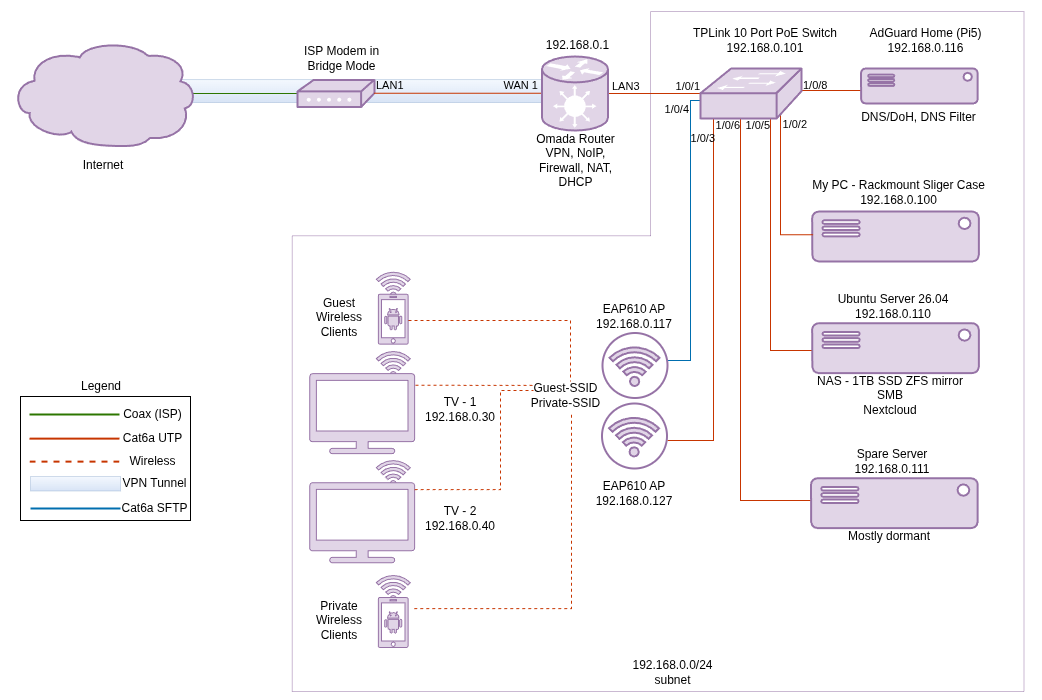
Do I ditched TrueNAS/Plex for Nextcloud. This gives me a seamless mobile -> PC -> web experience similar to Google Work Spaces or Microsoft365 services. The i7 2700 server got Ubuntu Server 26.04, Nextcloud AIO docker, and samba for local share still.
I had just moved to a new location so I introduced another EAP610 AP into the network for better WiFi coverage, no mesh, just SSID match, Tx power tweaking, and channel overlap tweaks for a simple roaming setup. While I was doing this I finally got around to setting up a proper guest SSID and migrated the TVs over to this.
Because my Raspi got freed up, I decided to test out AdGuard Home on the Raspi. This is a local DNS server that supports DNS filtering, DoH/DoT, as well as a bunch of other features. The amount of data collection and telemetry that gets blocked at the DNS level by this device is staggering and TVs are the worst offenders. My problem is, if this device goes down, AdGuard is useless, and if you have a reliable secondary DNS like 1.1.1.1 set up at the DHCP level then AdGuard fails to do its job without really noticing. That is how I had this setup originally. My Pi lost power, and I had been using 1.1.1.1 for over a week. A workaround is to allow it to fail without secondary DNS so you can intervene OR setup a redundant server. Below is where I ended up after the move and re-configure.
Recent Changes and Current Setup
I will cover this more in the recent changes section where I attempted to document most of this. I was working on this website and took a pause to play around with some network changes, and to be honest I got a bit lost here and there.
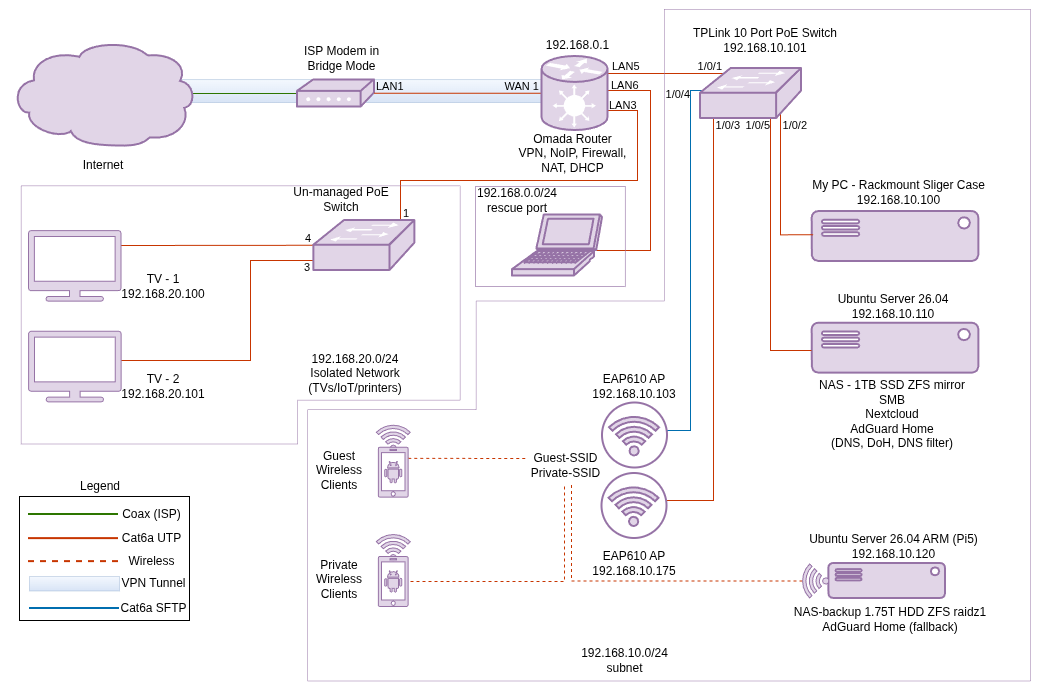
Hardware changes were big here, the dormant ex-security server project was essentially migrated to my main server. So I went from an i7 2700 16G DDR3 system to a AMD Ryzen 3 3200G 16G DDR4 system, the biggest drawback is multi-threading (4c/8t vs 4c/4t) but its a newer architecture, better ram, and has an iGPU so I could utilize the PCI-E slot and still have a video out, I don't like fully headless servers here at home and I tend to use a mixture of KVM and SSH to manage/configure these systems. Then I ditched the dedicated Pi5 AdGuard server and migrated AdGuard to the newly upgrade Ubuntu Server.
I decided to segregate my network into organized pieces with VLANs directly from the ports on the router and not utilizing 802.1Q due to some limitations with the equipment I have. 192.168.20.0/24 is basically reserved for untrusted devices (TVs, IoT, printers, etc.), and unfortunately because I cannot tag from the switch, this is a wired only solution, until I can upgrade and swap out some equipment. Right now VLAN20 is just an unmanaged switch with some ACL permissions at the router and the TVs are hardwired to this device. And 192.168.0.0/24 was left in place as a rescue port directly to the router that I can patch a laptop into if I accidentally lock myself out of the network somehow.
One of the biggest problems with previous renditions of this network is the lack of backups in this setup, RAID doesn't count of course, but is handy for redundancy. And to be totally blunt, my data is not critical. My old course work, pictures, music; the irreplaceable data from many years ago, is cold stored off-site in a secure location and locally. I have a ZFS raid mirror on the main server and never enabled sanoid snaps, so I did that. Nexcloud has its own backup system built-in with borg layered onto it, so I enabled this as well. Then recruited the Pi5 again to build a sort of logically air gapped "remote" one way storage system with a layer of encryption (it is really local but can be deployed remote with a couple of tweaks). Then I have my periodic cold storage process I have been practicing for years. The Pi5 backup server also has another instance of AdGuard running on it as a secondary DNS in the case that my primary server needs to be taken offline. Below is where I landed after this phase. See the recent changes section for some narrative of these specific changes and see the future plans section for future plans on changes I'd like to make in the future.